

Zebra ZD230 Review - Simple, Reliable and Cost-Effective
The Zebra ZD230 replaces a long line of dependable desktop printers — including the GC420d and GC420t — and aims to offer the same familiar simplicity in a more modern value package. It’s positioned as an everyday label printer rather than a premium workhorse, and that’s very much how it behaves in practice.
It’s generally suited to teams that need straightforward, low maintenance printing for lighter workloads, where ease of setup and predictable results matter more than advanced features or speed. If you’re after something that gets on with the job, the Zebra ZD230 tends to sit comfortably in that space.
Its popularity comes from that balance: a sensible price, a familiar feel, and enough capability for routine labelling without overcomplicating things. This Zebra ZD230 review takes a closer look at how it performs day to day and where it may or may not fit into your workflow.
Who is the Zebra ZD230 designed for?
Stripping things back to the essentials, the Zebra ZD230 barcode printer delivers Zebra’s trusted quality at a far more accessible cost. It’s built to be simple and dependable, which is perfect if you don’t need anything fancy and just want a label printer for lighter duty print runs.
Common Use Cases
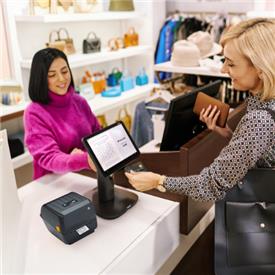
The Zebra ZD230 slots neatly into all sorts of environments, including retail counters, small warehouses, healthcare desks, and even light manufacturing. We typically see our customers use it for the following:
- Asset tracking
- Inventory management
- Shipping labels
- Price Labels
- Patient identification
Key Features
Here’s a quick rundown of the ZD230’s key features:
- 4 inch print width — the standard size for everyday labels
- Direct thermal or thermal transfer — choose the method that suits your label durability requirements
- 6 ips print speed — quick enough for steady, daily tasks
- 203 dpi resolution — crisp barcodes and clear text without overkill
- Compact footprint — easy to slot onto a desk, counter or packing bench
- LED indicator and button for media — feed, pause and troubleshoot without fuss
- Option of factory installed peeler or cutter — handy if you want a little extra convenience
- Zebra Print DNA apps — pre—installed, optional tools that make setup and management feel smoother
How the ZD230 Handles Daily Tasks
The Zebra ZD230 is at its best when you’re running smaller on—demand print jobs rather than fast, higher volume print jobs.
Print quality
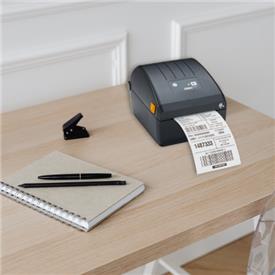
Zebra’s print technology does exactly what you need it to here. At 203 dpi — the industry standard for most desktop label printers — the Zebra ZD230 delivers crisp, reliable barcodes, shipping labels and retail stickers.
It’s not trying to be ultra high resolution, and it doesn’t need to be for the recommended use cases. It’s built to be consistently clear, and that’s what matters when your workflow depends on labels scanning the first time without slowing you down.
Speed and consistency
At 6 inches per second, the Zebra ZD230 keeps a steady, dependable pace, which is great for short runs and everyday tasks. For heavier, continuous workloads, you might find that one of the more advanced models suits you a little better.
Reliability over long shifts
Zebra has a reputation for building kits that just keep going, and the ZD200 series follows that same DNA. The Zebra ZD230 is sturdy, predictable and consistent as long as you’re using it within its intended workload.
The ability to take a 300m ribbon on thermal transfer models is a nice touch too, cutting down the number of media changes and keeping your workflow smoother.
Noise levels
When it comes to noise, the Zebra ZD230 behaves exactly as you’d expect from a compact desktop printer. It hums along quietly in the background.
Setup and Ease of Use
One of the nicest things about the Zebra ZD230 is how unintimidating it is to set up. It’s very much a “plug it in, follow a couple of prompts, and you’re off” kind of printer, which is perfect if you don’t want to wrestle with tech or spend your afternoon troubleshooting.
What’s in the box
You get everything you need to get started straight away:
- Label printer
- USB Cable*
- Power supply
- Zebra ZD230 setup guide
*Don’t panic if you can’t find the USB port. It comes covered with a bright yellow reminder sticker, which is a gentle nudge to install the drivers first.
Driver Installation
The Zebra ZD230 driver installation is very straightforward. You download the files from Zebra, run the installer, and it handles the rest.
Loading labels
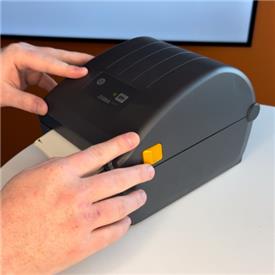
Loading labels is just as easy with the Zebra ZD230. The front loading clamshell design means you open the cover, drop your roll in, feed it through, and close it up.
Inside the printer, you’ll find media guides and a helpful instructional graphic for loading. It’s quick, tidy, and doesn’t require any fiddly adjustments.
Calibration
This sounds technical, but the Zebra ZD230 media calibration process is genuinely quick and painless. Once your labels are loaded and the printer is powered on, press and hold the Feed button until the status light blinks off and on twice, then let go. The printer will feed a couple of labels to measure the gaps and set itself up.
First print experience
Once your labels are loaded and the printer has been calibrated, you’re only a minute or two away from your first print. The Zebra ZD230 feeds a label as part of its startup routine, then it’s ready to go. Follow the steps in the guide, and your first label comes out quickly and without any fuss.
Where the ZD230 Shines
We recommend the Zebra ZD230 a lot, including for our Just Eat for Business labelling solution, and it’s easy to see why:
- Genuinely affordable — a great entry level option that keeps costs sensible without cutting corners
- Simple to manage — predictable, straightforward enough for anyone to pick up
- Good everyday print quality — consistent labels that scan reliably and look clean
- Low technical barrier — setup and daily use feel approachable, even if you’re not “techy”
- Built by people who know their stuff — Zebra’s experience shows in the way the printer balances solid engineering with real world user needs
Where It Falls Short
Every printer has its limits, and the Zebra ZD230 is no exception. Here are the main things to keep in mind:
- Not built for high volumes — it’s great for light duty jobs, but industrial level throughput will push it beyond its comfort zone
- Basic feature set — fewer driver controls and fewer customisation options compared to Zebra’s more advanced ranges
- Limited accessories — there are far fewer ZD230 accessories compared to other Zebra desktop models
- No display — unlike the ZD621, there’s no screen to guide you on the Zebra ZD230, so the user experience is simpler but less intuitive
- 203 dpi only — perfectly fine for everyday labels, but it can struggle with very small labels, dense 2D and QR barcodes or tiny graphics and fonts
ZD230 vs Other Zebra Printers
Zebra’s desktop range covers a wide spread of features and budgets, and the Zebra ZD230 sits comfortably in the value tier. Its closest neighbours are the Zebra ZD220, ZD421 and ZD621, each offering different price points and capabilities.
ZD230 vs ZD220
Both printers sit within the ZD200 series, and both offer excellent value, but they’re aimed at slightly different needs.
- Zebra ZD230 has the edge on functionality — faster speeds, more connectivity options and an optional cutter
- Zebra ZD220 is the budget choice — ideal if you need the most cost effective, basic label printer possible
If you want the best balance of price and capability, the Zebra ZD230 usually wins.
ZD230 vs ZD421
This is where the gap starts to widen. The ZD421 moves into Zebra’s advanced category, bringing a noticeable jump in performance and flexibility.
- 300 dpi options for sharper small labels and dense barcodes
- Stronger build quality and better long term durability
- Movable sensor for greater media compatibility
- Wider accessory ecosystem for more specialised workflows
The Zebra ZD421 is a better fit for higher print volumes and tighter operational workflows. The Zebra ZD230 remains the more budget friendly choice for lighter, everyday requirements.
ZD230 vs ZD621
The ZD621 sits at the premium end of Zebra’s desktop range and is designed for demanding, high performance environments.
- Up to 8 ips print speeds
- Higher duty cycle for continuous, intensive use
- 300 dpi resolution model options
- Movable media sensors for maximum flexibility
- Touch LCD interface models are available for easier navigation
- RFID model available for advanced applications
The Zebra ZD621 is built for operations that rely heavily on print performance and uptime. The Zebra ZD230, by comparison, is ideal for cost conscious teams with straightforward labelling needs.
FAQs
Here are some of the most common questions customers ask about the Zebra ZD230.
Is the ZD230 compatible with other Zebra printer setups?
Yes. The Zebra ZD230 supports both of Zebra’s main command languages — EPL2 for older models and ZPL for newer ones — so it can slot into most existing Zebra installations without any drama.
Can the ZD230 use linerless labels?
No, the Zebra ZD230 doesn’t support linerless media. If you need linerless printing, the ZD621 is the closest compatible option.
Which software applications come with the Zebra ZD230?
The Zebra ZD230 runs on Zebra’s Link—OS platform and includes Print DNA tools such as Zebra Setup Utilities and Zebra Designer Essentials. These are more than enough to get started at this level.
Which ribbons do I use with the Zebra ZD230t?
74m or 300m ribbons can be used with the Zebra ZD30t.
Are third party ribbons compatible with the ZD230t?
Yes, third party ribbons can be used for the Zebra ZD230 with ribbon core adapters. That said, we usually recommend genuine Zebra ribbons for the best print consistency and compatibility — they’re designed specifically for these printers.
Zebra ZD230 RibbonsZebra ZD230 Core Adapters
What are my Zebra ZD230 warranty and service options?
The Zebra ZD230 typically includes a 3 year manufacturer’s warranty covering defects. Zebra also offers optional service upgrades, including wear and tear coverage, faster turnaround times and access to live technical support.
How do I access the ZD230 printer driver download?
You can download the latest Zebra ZD230 drivers directly from zebra.com. Zebra keeps these updated, so it’s always worth grabbing the newest version.
Verdict: Is the Zebra ZD230 Worth It?
The Zebra ZD230 is a strong entry level label printer that does exactly what it sets out to do: provide simple, reliable everyday printing without unnecessary complexity. It replaces older models with a more modern, familiar feel, and it’s well suited to lighter workflows where predictability, affordability and low effort matter more than enhanced functionality.
It’s perfect for teams who want a no fuss desktop printer for routine labels — retail counters, small offices, kitchens, stockrooms and any environment where print volumes stay modest. If you value ease of setup, low maintenance and a sensible price point, the Zebra ZD230 just makes sense.
Those who should consider upgrading are teams with higher print volumes, tighter workflows or more specialised requirements. Models like the ZD421 or ZD621 offer sharper resolution, faster speeds, better connectivity and more media flexibility.
Overall, the Zebra ZD230 remains a strong entry level choice because it’s dependable, approachable and cost conscious — a practical option for businesses that need everyday labelling without the overhead of a more advanced device.
View full Zebra ZD230 specifications and pricing
For more guidance on the Zebra ZD230 or other desktop label printers, reach out to our team. We offer technical insight, wide stock availability and continued support across solutions.