


Best Business Tablet for UK Workflows
Touchscreen tools are everywhere, and using a business tablet can turn that everyday familiarity into something genuinely useful for getting things done. They’re light, versatile, and built to keep staff moving.
This guide gives a quick look at why so many teams are relying on work tablets, essential features, and a simple framework for choosing the right device. And to round things off, we highlight our top pick — the RT112 from Unitech — our choice for best windows business tablet. Built for modern retail, warehouse, hospitality, and small business environments, it is a smart choice for UK teams.
Why Are UK Businesses Relying On Tablets For Work Rather Than the Traditional Desktop and Laptop Setups ?
Teams are turning to business tablet computers because they make everyday tasks faster, smoother, and more flexible. A good business tablet gives staff the freedom to move, serve, update, and respond without being tied to a desk.
- Lightweight mobility — easy to carry, whether you’re working on the shop floor or travelling across the country.
- Better customer engagement — perfect for sales presentations, product lookups, and on—the—spot support.
- Versatile usage — styluses, keyboards, mounts, and docks let tablets bridge the gap between mobiles and desktops.
- Instant note taking — quick capture of tasks, updates, and customer details
- Cost saving — not only does one device replace multiple tools, but it also often has a lower price than desktop alternatives.
This ultimately bridges the gap between business laptops or desktop pcs and mobile phones, providing a far more efficient tool for business users.
What's the Difference Between a Consumer Tablet and a Business Tablet?
A business tablet is built for real world work, not casual use. The differences are simple but significant:
- More rugged — designed to handle drops, knocks, and busy environments
- Longer lifecycle + support — built for multi—year commercial use, not short consumer refresh cycles
- Better security — enterprise grade protection for business data, devices, and networks
These upgrades make enterprise tablets dependable tools for frontline teams — durable, secure, and ready for everyday operations.
Key Features to Look For in a Business Tablet
The best business tablets account for real world working conditions and include essential features tailored to everyday operations. Here’s what to look for if you’re considering using tablets for business:
- Fast Processing Power — Can your business tablet keep up with your workflows? The RT112 is powered by the Qualcomm® 6490 platform, ensuring efficient and consistent performance.
- Portability — One of the strongest arguments for using a tablet for business is the ability to stay flexible and agile on the job. Smaller than an A4 sheet and weighing under 700g, the RT112 fits easily in work bags and remains comfortable to use throughout the working day.
- Reliable Durability — If you’re carrying your business tablet all day, especially in demanding environments, it needs to withstand knocks, drops, dust, and water. The RT112 has a rugged build with an IP67 rating and a 1.5 meter drop specification for enhanced endurance.
- Compatible Operating System — Your data is the core of your business, and using an incompatible or unstable operating system poses a risk. Additionally, the apps you use daily need to be replicated on whichever device you choose. Fortunately, the RT112 offers an Android 13 option, as well as a Windows tablet option — making it a strong choice for the best Windows tablet for business.
- Stable Connections — What’s the point of investing in portability if you can’t connect wherever you go? The RT112 delivers effortless connectivity with Bluetooth® 5.2, WiFi 6E with fast roaming capabilities, and 5G connectivity.
- Battery Life — Just like connectivity, long battery life is essential when relying on a portable device. The high capacity 8800mAh removable battery ensures reliable power for extended operations, keeping the RT112 running smoothly throughout demanding work shifts.
- Glove Compatible Touchscreen — Usability goes beyond speed and connectivity; it also involves how easily you can handle the device. We frequently receive requests for glove compatible computing devices, like business tablets, because users don't want to waste time fiddling with safety gloves. The RT112 is compatible with gloves up to 4mm thick, eliminating this issue for users across a range of industries.
Are there any recommended accessories or add-ons that can enhance the functionality of a business tablet in UK workflows?
When it comes to enhancing the functionality of business tablets in UK workflows, there are several recommended accessories and add-ons that can make a significant difference. Some key items to consider include:
- Stylus pens: Stylus pens can provide a more precise and natural way to interact with your business tablet, especially when taking notes or sketching out ideas. This can be particularly useful for professionals who need to annotate documents or draw diagrams on their tablets.
- Keyboard cases: Keyboard cases can transform your business tablet into a more traditional laptop-like setup, making it easier to type up emails, reports, or presentations. This can greatly enhance productivity for those who prefer a physical keyboard over a touchscreen tablet.
- Portable chargers: Keeping your business tablet powered up and ready to go is crucial, especially when you're on the go or working remotely. Whilst we recommend prioritising devices with long battery life, investing in a high-quality portable charger can ensure you never run out of power at a critical moment.
- Privacy screens: For those who handle sensitive or confidential information on their business tablets, a privacy screen can help protect their data from prying eyes. These screens limit the viewing angles of your tablet, making it harder for others to see what's on your screen.
- Screen protectors: Protecting your business tablet's screen from scratches, smudges, and cracks is essential for maintaining its usability and appearance. A high-quality screen protector can prolong the life of your tablet and keep it looking new.
By incorporating these accessories and add-ons into your workplace tablet setup, you can enhance its functionality and tailor it to meet your specific business needs. Whether you're using Windows tablets or other enterprise tablets, these accessories can help you make the most of your device in a UK business environment.
Practical Applications of Workplace Tablets
Business tablets shine in environments where staff need to move quickly, access information instantly, and stay connected throughout the day. Here are a few places they make the biggest impact:
- Retail tablets — stock checks, product lookups, queue—busting, mobile POS
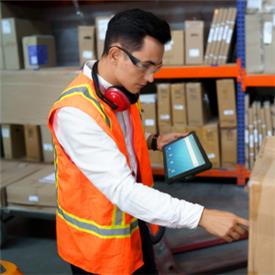
- Warehousing & Logistics tablets — picking, scanning, inventory updates, shift—ready mobility
- Hospitality Tablets— ordering, guest service, table—side payments, staff coordination
- Office tablets — communication, collaboration, mobility, workflow efficiency
- Small Business Tablets — admin tasks, scheduling, customer interactions, on—the—go productivity
The RT112 from Unitech fits naturally into all of these workflows thanks to its rugged build, long battery life, and easy to use touchscreen design.
How to Choose Your Business Tablet
Choosing the best tablet for work doesn’t need to be complicated. A simple three step framework helps you narrow things down quickly and confidently — and makes it clear why the RT112 from Unitech stands out.
Identify Your Workflows
Start with where the enterprise tablet will actually be used.
Retail teams need fast product lookups and customer interaction. Warehouse staff need scanning and durability. Hospitality teams need mobility and the ability to order quickly. Small businesses need a reliable device for admin, scheduling, and daily tasks.
Your workflow defines your must—haves.
Match the Essential Business Tablet Features to Your Needs
Once you know the job, match the features that support it:
- Fast performance for multitasking, especially across multiple active apps
- 5G + WiFi 6E for constant connectivity
- Long battery life for shift work
- Compact design for working on the move
- Rugged build for drops, knocks, and real world use
- Glove—friendly touchscreen for busy environments
- Optional keyboards, styluses, and mounts for flexibility
These are the core traits that make a business tablet genuinely work—ready — and they’re exactly what the RT112 delivers.
Check Compatibility With Your Existing Systems
The right OS should fit smoothly into your current setup.
Many businesses rely on existing Windows for their laptop and desktop setup. This can make integrating an android tablet difficult, due to lack of compatibility with software and apps. However, it is not impossible.
Look for a platform that supports your business apps, security policies, device management tools, and IT workflows. The RT112’s Android and Windows business tablet options make it easy to integrate with existing systems, software, and security — reducing friction and speeding up deployment.
Business Tablet Price For Small Businesses and Large Organisations
When choosing the best business tablet for UK workflows, price is a crucial factor. It's essential to find a tablet that balances affordability and functionality, ensuring it meets specific needs without overspending. Evaluating the price helps companies invest wisely, enhancing overall efficiency and success.
Unitech's business tablet range offers an attractive price point for both small businesses looking for a single tablet and large organisations needing full fleets. Talk to the ERS sales team for Unitech business tablet deals, technical support and guidance on your computing solutions.
Which Tablet is Best For Business? Meet the RT112
When you look at what workplaces actually need from their productivity tablets—reliability, mobility, durability, and seamless integration with existing systems—one device consistently stands out. The RT112 is built for real world environments, making it an excellent choice for UK teams who need a reliable staff tablet.
Here’s what we love about the Unitech RT112 business tablet:
- Fast, familiar performance — Windows and Android OS options keep everything compatible and easy for staff
- Rugged and ready — built to handle drops, knocks, and busy frontline environments
- Full shift power — long battery life with hot—swap capability for uninterrupted work
- Always connected — 5G, WiFi 6E and Bluetooth for smooth, reliable mobility
- Glove—friendly touchscreen — ideal for retail counters, warehouse aisles and hospitality floors
The RT112 is lightweight for customer-facing roles, durable for industrial use, and user-friendly for everyday admin, making it ideal for a wide range of applications. It’s an enterprise tablet computer that feels familiar, performs reliably, and integrates cleanly with the systems teams already use.
Shop RT112 Android TabletShop RT112 Windows Tablet
Business Tablet Alternatives
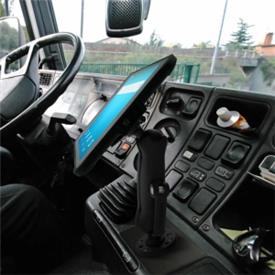
When your workflow needs something a little different from the ultra mobile RT112, the TB170 Plus steps in as a solid, familiar alternative. It keeps the same rugged reliability but adds a brighter 800 nit display for outdoor or vehicle—mounted use, plus expanded wired connectivity for fixed stations, docks, and legacy peripherals. If your team works in high glare environments or relies on stable, hardwired setups, the TB170 Plus offers a dependable, no surprises fit that slots straight into established workflows.
Need Help Finding the Best Tablet For Business Productivity?
If you’re exploring tablets for business purposes and want a device that genuinely fits your workflow, ERS can help you make the right call. Our team works directly with businesses across a variety of industries to match the best business tablet to the way your staff actually work.
Whether you need rugged durability or small business simplicity, we’ll help you choose a business tablet solution that keeps your team productive from day one.