

Easy Labelling Software With TSC Standalone Creator
TSC Standalone Creator is specialised software for select TSC printers with touch panels that simplifies label printing processes. It allows users to easily design interactive menus and custom labels using an icon—based drag—and—drop interface.
With no programming knowledge required, it allows businesses to quickly build and manage standalone printing applications, making label creation faster, easier and more efficient.
What Can You Do With TSC Standalone Creator?
The world is your oyster with TSC Standalone Creator, thanks to its intuitive software design for TSC Barcode Printers. At a glance, it provides a quick and simple label printing interface, but it offers so much more.
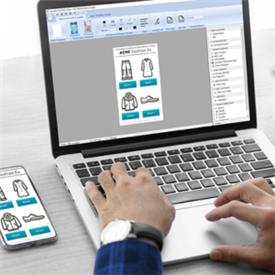
Drag—and—Drop TSC Label Printer User Interface
Creating professional label templates has never been easier. With a user—friendly visual interface, individuals can design labels quickly and effortlessly, eliminating the need for coding skills or advanced technical expertise. This accessibility allows anyone to produce high—quality labels tailored to their needs.
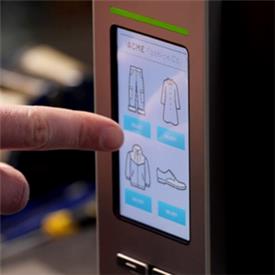
Custom Touch Panel Menus
You can design tailored touchscreen menus that include background images, customisable menu lists, variable data fields, and dynamic graphic elements to align with your specific business requirements. This flexibility allows you to create an engaging and user—friendly experience for your teams.
Label Template Creator
Simplify your label printing process by utilising label templates with customisable settings tailored to your business requirements. This tailored approach can enhance efficiency and ensure your labels meet your unique specifications.
Direct TSC Printer Download
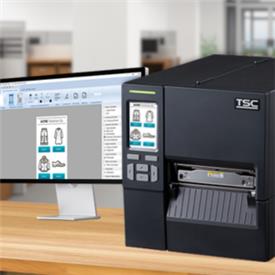
Completed design files can be transferred directly to a single TSC label printer through a straightforward one—click download process. This feature ensures that deployment is both quick and hassle—free, streamlining your workflow.
Share to Multiple TSC Barcode Label Printers
Use the TSC Console File Manager to deploy design files to networked TSC printers or update the latest database via USB or memory card for accurate data printing.
Advanced TSC Standalone Creator Customisation Features
TSC Standalone Creator automatically displays the most recently used printer settings for easier printer operation and management.
It also allows for advanced programming development on your TSC printer with supported BAS files.
How To Use TSC Standalone Creator
To begin using TSC Standalone Creator, you will need access to a computer or laptop. First, visit the TSC website to download the software and follow the installation instructions provided. Once the installation is complete, connect your computer to the printer via USB or network connection, and you’re all set!
How Do You Manually Set Up Menus With TSC Standalone Creator?
Take advantage of Standalone Creator’s user—friendly drag—and—drop tool to easily incorporate various elements into your menu, including buttons, text, and images. Located on the Standalone Creator app, you can customise the layout to meet your specific needs and preferences. After you’ve designed your menu, you can assign specific actions to each element, such as initiating a print job or enabling data entry features.
When you’re satisfied with your menu design and functionality, connect your printer using either a USB cable or through a network connection to deploy your final product. This seamless process ensures that your menu is not only visually appealing but also fully functional and ready for use.
How Do You Send Label Templates to Your TSC Label Printers?
To transfer label templates to your TSC printer, ensure you are connected to your computer via a USB cable or network connection.
Open the Standalone Creator app and select the 'Send' option to initiate the transfer. The template will be downloaded and saved in the printer's internal memory, making it accessible for standalone printing at any time.
Who Is TSC Standalone Creator For?
Whether you're an end—user or a Systems Integrator, TSC Standalone Creator is perfect for anyone who wants quick, simple, no—code label creation straight from their TSC printer.
This includes the following;
- Small businesses — price labels, product tags, stockroom organisation, customer order labels.
- Warehouses — pallet IDs, inbound/outbound labels, inventory management.
- Manufacturers — work—in—progress labels, component IDs, asset tracking labels.
- Retail teams — shelf—edge labels, click—and—collect slips, returns processing.
- Hospitality — food prep labels, order tickets, check—in tags.
- Healthcare — patient check—in, prescription collection, specimen labels.
It’s built for users who value speed, clarity, and hands—on control — without needing technical expertise or programming skills. Additionally, it can benefit System Integrators looking to deploy standalone applications quickly and with less friction during the integration process.
Compatible TSC Label Printers
When you combine TSC Standalone Creator with the right label printers, everyday labelling becomes faster, sharper and far easier to manage.
Standalone Creator is compatible with any touchscreen TSC Printer — explore the wide range of compatible models below.
TSC Desktop Label Printers
- TSC TH DH 220 — compact, 2 inch direct thermal desktop printer designed for reliable label printing in retail, logistics, healthcare, and office applications.
- TSC TH DH 240 — powerful desktop label printer with direct thermal and thermal transfer options, best suite to demanding manufacturing, warehousing and logistics applications.
- TH DH 220 and TH DH 240HC — healthcare variants of the TH DH 220 and TH DH 240 Series.
TSC Industrial Label Printers
- MX241P — rugged, high—speed industrial thermal transfer printer, ideal for high—volume label printing in manufacturing, logistic and healthcare.
- MH241T — robust, high—performance industrial thermal transfer printer designed for warehouse, logistics, and manufacturing applications.
- MH261 — 6 inch variant of the MH Series.
- MB241 — award—winning industrial thermal transfer printer with high print speeds and print quality in demanding environments.
- TTP—286MT — one of the few industrial 8 inch thermal transfer label printers available, capable of 203 dpi and printing 6 inches per second.
Other TSC Software Tools
TSC’s software offering doesn’t end with Standalone Creator — discover the variety of tools available for building a comprehensive label printing solution. Find out more in the TSC integrated print solutions brochure attached below.
TSC Console
Introducing a cutting—edge software solution designed for swift and seamless remote monitoring of your printers! With this powerful tool, you can effortlessly configure settings, detect potential issues, and resolve them in no time.
TSC Console Web
TSC Console Web is a web—based version of the TSC Console, allowing flexible management of printers from anywhere in your workplace. Learn more about how it enhances troubleshooting efficiency and reduces downtime in our blog.
TSC Cloud Connect
TSC Cloud Connect revolutionises printing by offering seamless, driver—free access from any device! With powerful API, SDK, and enterprise integrations, it ensures a scalable and connected printing experience for everyone.
Make Label Printing A Breeze With TSC Standalone Creator
So now you know a little bit more about TSC Standalone Creator, its clear why it’s such a popular tool across label printing. Bring flexibility and simplicity to your labelling processes with your next touchscreen TSC Printer.
Learn more about Standalone Creator via the TSC website.