
Choosing The Correct Industrial Scanner
Choosing the right industrial scanner isn’t just about reading barcodes—it’s about keeping your operations running smoothly. In fast-paced environments like warehouses, logistics hubs, and manufacturing floors, the wrong scanner can mean downtime, bottlenecks, and higher costs.
So, how do you make sure you’re picking the right handheld scanner for your business? Let’s break it down into four key factors.
4 Factors to Consider When Buying An Industrial Scanner
When upgrading your barcode scanners, keep these essentials in mind:
- Scanning Performance
- Durability
- Connectivity
- Total Cost of Ownership (TCO)
Scanning Performance
Performance is everything. A scanner that struggles with misreads or slow decoding can stall workflows and frustrate your team.
What to look for:
- Fast barcode reading and high decode rates
- Flexible reading distances (short and long range)
- Ability to handle damaged or poorly printed barcodes
- Clear “good read” feedback for every scan
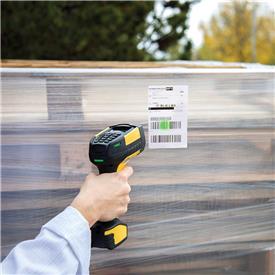
Example: PowerScan 9600 Series
- Reads both 1D and 2D barcodes with ease
- High-performance models scan up to 2m away
- Up to 20% faster than competing scanners*
- Green Spot technology ensures accurate reads—even on tough barcodes
- Auto Range options switch between close-up and long-distance scanning
- Document scanning option features allow capture of colour images
*According to Datalogic.
Durability
Industrial environments are tough. Drops, dust, and heavy use can quickly wear down fragile devices.
What to look for:
- Drop resistance (1.5–3m depending on use case)
- IP65+ ingress protection against dust and moisture
- Trigger button hit resistance without failure
Example: PowerScan 9600 Series
- IP65 and IP67 rated
- Withstands 2.5m drops onto hard concrete
- Trigger tested for 10 million hits
- Wireless charging system reduces damage to internal components
Connectivity
Smooth operations depend on reliable communication between scanners and systems— especially with wireless scanners.
What to look for:
- Strong Bluetooth, radio, or Wi-Fi connections
- Real-time data transfer and feedback
- Easy integration with existing systems
Example: PowerScan 9600 Series
- Cordless options with Bluetooth 5.0 and narrow-band radio
- Bidirectional radio communication with display feedback
- Plug-and-play design for quick setup
Total Cost of Ownership
A cheap scanner might save money upfront — but if it breaks often or misreads codes, it can cost far more over time through repairs, replacements, and lost productivity.
What to look for:
- Efficient maintenance and monitoring
- Rugged build to minimise repair costs
- Consistent battery performance.
Example: PowerScan 9600 Series
- Charging cradles report on device health for preventative maintenance
- Ultra-rugged design reduces damage-related costs
- Includes smart technology which optimises battery health.
Final Thoughts: Which Handheld Industrial Scanner Is Best?
Finding the correct industrial barcode scanner means balancing performance, durability, connectivity, and long-term value.
The Datalogic PowerScan 9600 handheld scanner series is a standout choice, offering rugged design, advanced scanning technology, and smart connectivity options that fit demanding industrial environments.
Discover PowerScan 9600 RFID Rugged Scanners
Need more guidance? Talk to the scanning experts at ERS.